For venues
SimWerk for venues.
SimWerk sells hardware and software to sim racing venues, dealerships, performance shops and tracks. Your drivers get Verified laps and leaderboards that follow them from venue to venue; your venue keeps its seat-time revenue.
What SimWerk sells
Rigs, software and the drivers who come back.
Hardware
Rigs to your spec
SimWerk Core and SimWerk Grand chassis with MOZA Racing, Thrustmaster and other brands' gear, fixed or on motion, specced in our 3D configurator. For large orders we CNC-machine brackets with your own brand, shown together with SimWerk.
Open the configurator →Software
Verified laps on any rig
Once your venue is certified, a clean lap driven there in person, checked in by QR, in Assetto Corsa Competizione or Assetto Corsa, is Verified, whatever brand of rig it's on. Leaderboards, the check-in board, idle screens and the Staff page come with it.
The Verified rule →Your revenue
Your seat time stays yours
Your venue keeps its seat-time revenue, at your prices. SimWerk builds the community around it: Verified leaderboards that follow drivers from venue to venue and give them a reason to come back.
SimWerk software
Watch over every rig from your phone.
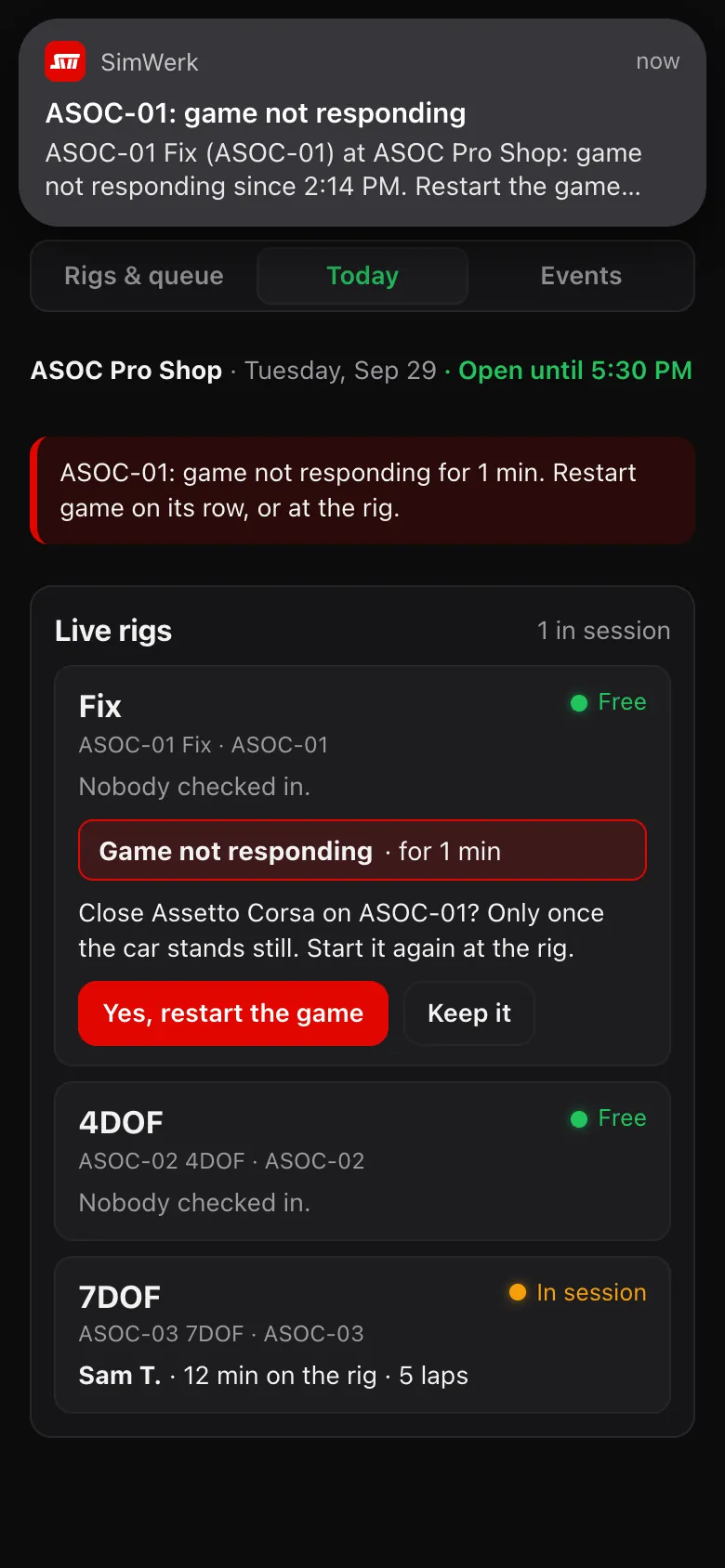
Every rig at your venue is connected to SimWerk. Guests check themselves in, free rigs keep selling, and a rig that needs a hand shows up on the Staff page, where your staff can close a stuck game or restart the PC from their phone.
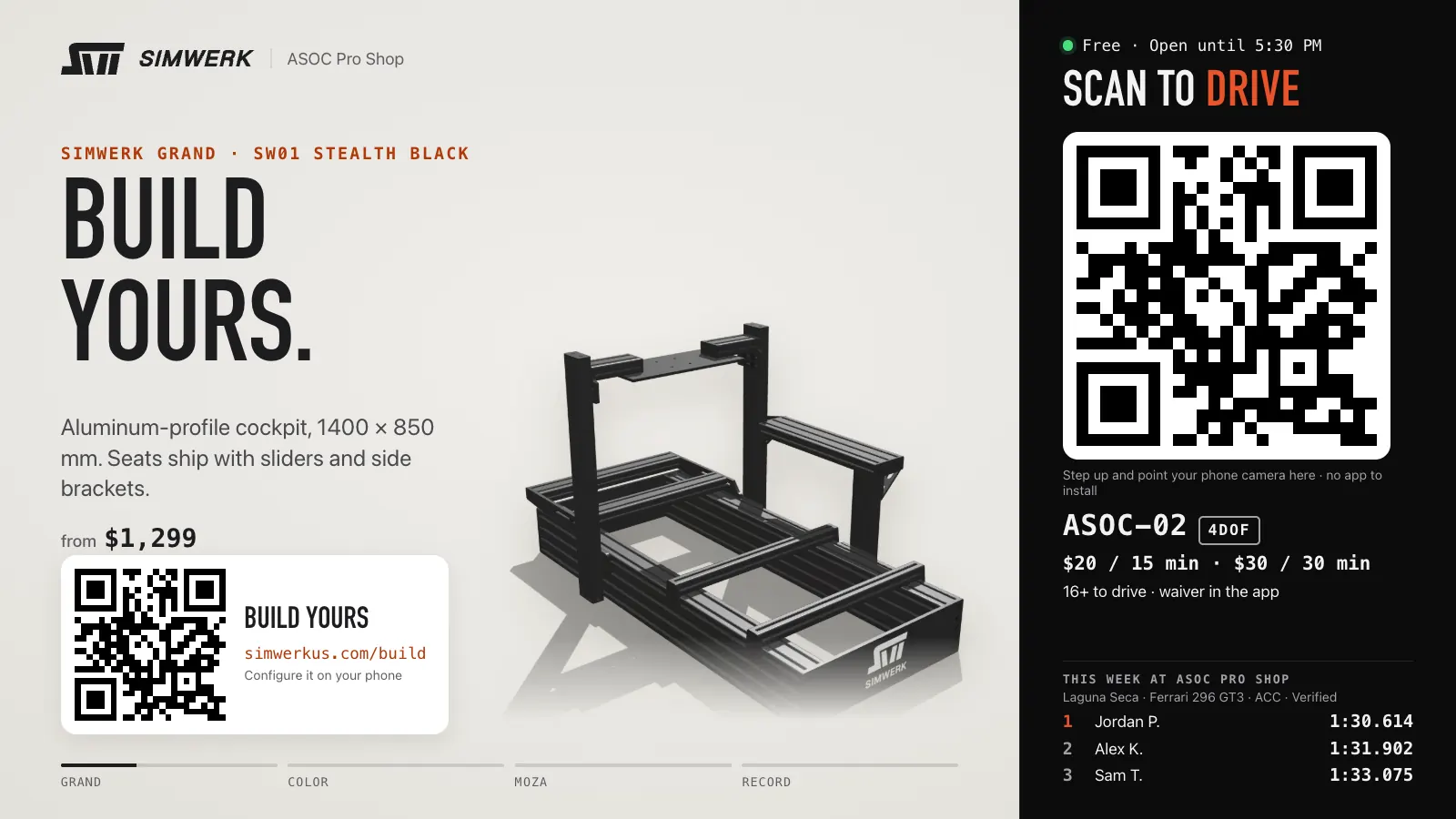
- Live at Pro Shop 01
Free rigs keep selling.
When nobody is driving, the rig's own screen loops SimWerk rigs and MOZA gear next to the rig's check-in QR, your rates and this week's fastest laps. It closes by itself when a game starts and shows Closed outside your hours, and we update the slides on every rig from SimWerk HQ.
- Live at Pro Shop 01
Guests check themselves in.
The first scan of a rig's QR signs a guest up and confirms your venue's waiver; after that, one scan checks them in and puts their name on the rig. Every lap they drive is saved to their account.
- Live at Pro Shop 01
Problems show on the Staff page.
If a game freezes or stops responding, a crash message pops up or a rig's idle screen goes down, your staff see an alert on the Staff page, on any phone, that names the rig and what to do.
- Live at Pro Shop 01
Fix it from your phone.
Close a stuck game, or restart the rig's software or the whole PC, from the Staff page with a confirm step first; staff then start the game again at the rig. The game and the PC never restart while a car is moving; the PC restarts only with nobody checked in, and on a motion rig so does the game.
Live at Pro Shop 01 Rig software updates install by themselves between sessions, never mid-drive, and each rig tells your staff whether its PC signs back in by itself after a restart.
Scan. Pick. Drive.
Guests pick a car and track on their phone and tap Go; the rig starts Assetto Corsa straight into that session and puts them in the car. The phone shows every step, and Ask staff calls for help if loading takes long. On motion rigs, staff pick and start the guest's drive from their phone after a seat, belt and emergency-stop check, and SimWerk HQ can switch phone starts off for any rig instantly. Assetto Corsa Competizione sessions are still started by staff.
Built · internal testing at Pro Shop 01 · not open to guests yet
See it from the guest's side →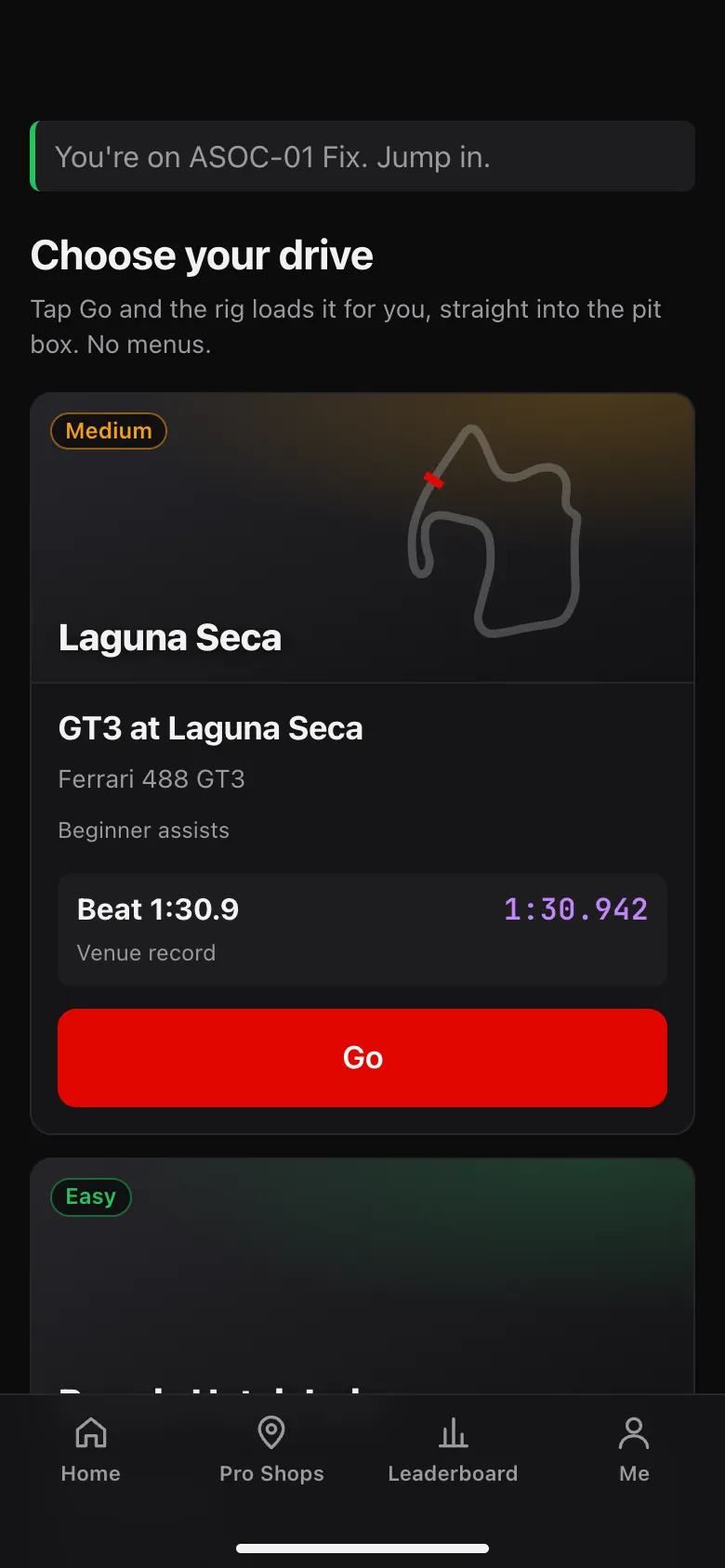
What you get
Hardware, software, community.
- Rigs to your spec: SimWerk chassis with MOZA Racing, Thrustmaster and other brands' hardware, fixed or motion. Installation is quoted with your order.
- Your own brackets on large orders: CNC-machined with your brand and shown together with SimWerk.
- Every rig on the SimWerk app, whatever its brand: QR check-in, Verified laps once your venue is certified, leaderboards, the check-in board, idle screens that sell, and alerts and restarts on the Staff page.
- Drivers who come back: Verified leaderboards that follow them from venue to venue, with events and school teams on the way.
The numbers
Prices by quote.
Hardware, software and installation depend on your venue and the rigs you choose. We go through them with you one-on-one and put them in your quote.
Talk to us
Tell us about your venue.
We're starting with venues in California and on the West Coast, where we can visit in person.
See it running at our test lab.
Pro Shop 01 in Laguna Hills runs every rig, game and app feature before it goes to venues.