SimWerk Venue, installed for you: every business runs differently, so we tailor it to yours. Rigs, drivers, screens and staff tools, built around how you work. Your venue keeps its seat-time revenue.
For a sim racing venue, dealership, performance shop, track or school, we build and install the pieces that fit, and tailor SimWerk Venue to how you work. Open a card to see what is in it.
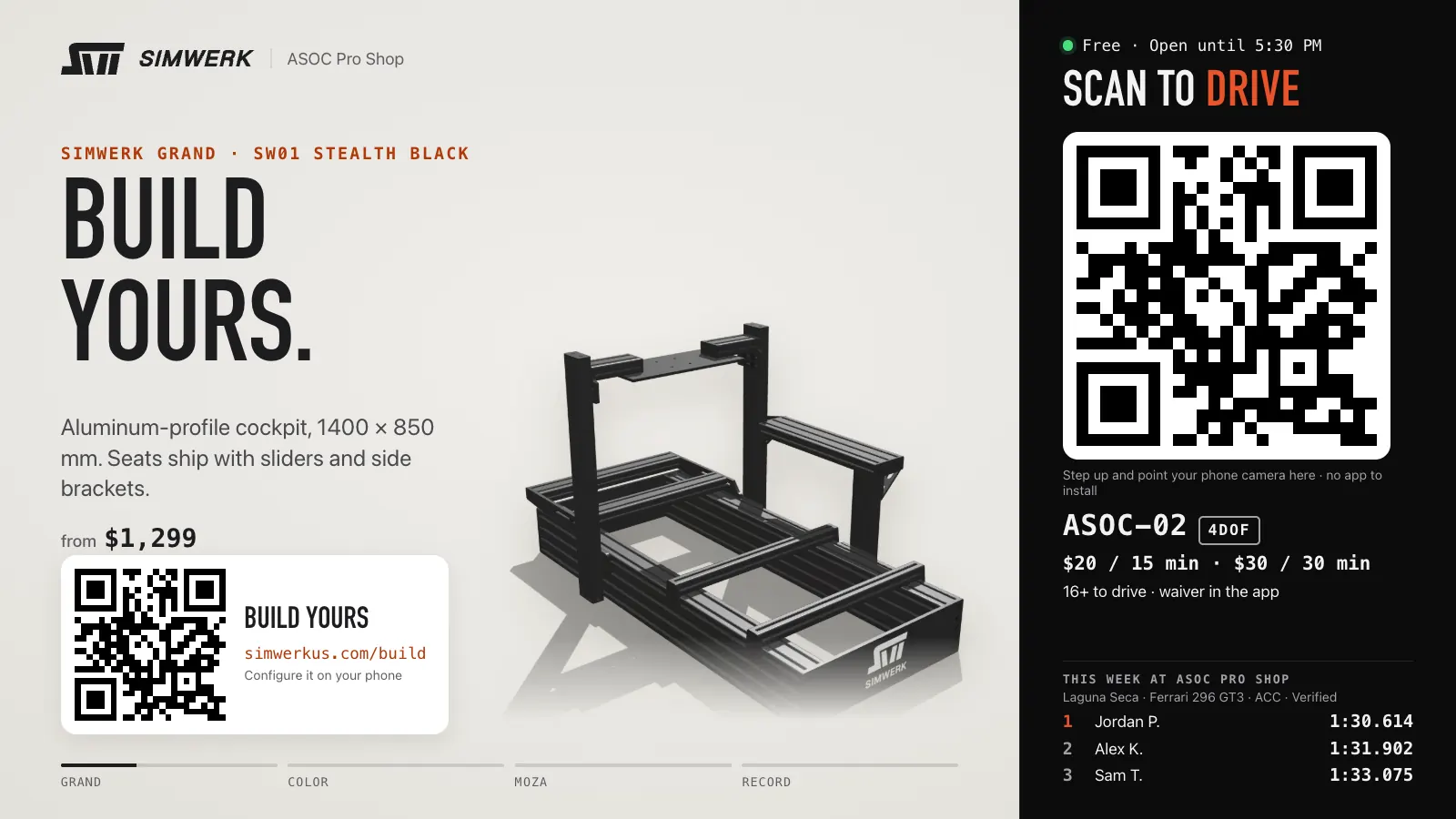
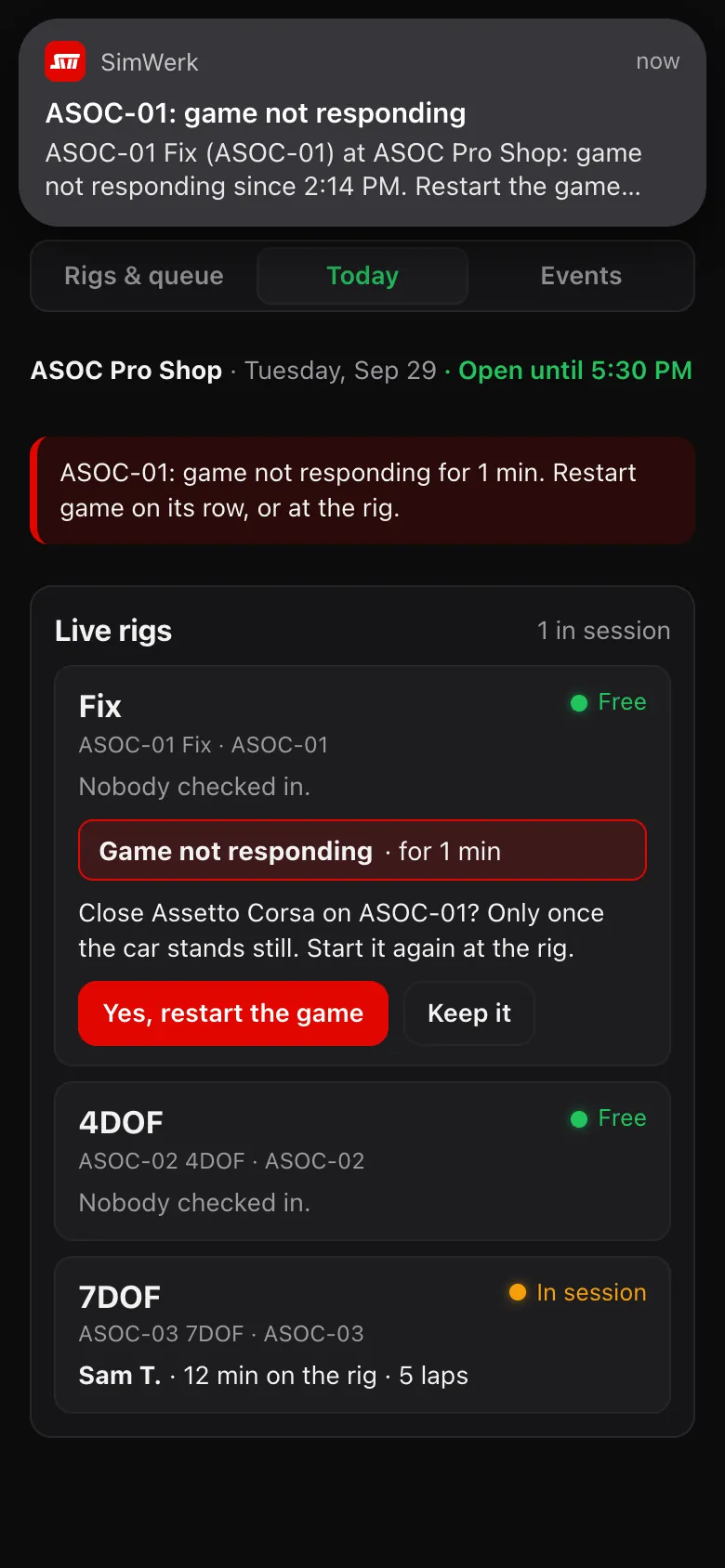
The rig idle screen and the Staff page · sample drivers and times
Live
Working today at Pro Shop 01, our test lab in Laguna Hills.
Now testing
Built and in testing at Pro Shop 01. Not open everywhere yet.
Coming
On our roadmap. No date yet.
Rigs and hardware
Rigs built to your spec.
SimWerk Core and SimWerk Grand, fixed or on motion, with the wheels, bases and pedals your drivers want.
What is in it (4)
SimWerk Core and SimWerk Grand
Aluminum chassis with MOZA Racing, Thrustmaster and other brands' gear, specified in our 3D configurator.
Motion
MOZA HMA150 haptic motion fits both chassis. SimWerk's own 4DOF and 7DOF systems are quoted per project.
Your brand on the brackets
On large orders we CNC-machine the brackets with your own brand, shown together with SimWerk.
Any brand of rig
SimWerk Venue works on any brand of rig, so the rigs you have today can join.
Guests sign up with one scan, and every lap lands on their account and on your boards.
What is in it (5)
Live
Guests check themselves in.
The first scan of a rig's QR signs a guest up and confirms your venue's waiver; after that, one scan checks them in. Every lap they drive is saved to their account.
Live
Verified laps
A clean lap in Assetto Corsa Competizione or Assetto Corsa, driven in person at a certified venue with you checked in by QR, on any brand of rig.
Live
Leaderboards
By game, track and car, with the fastest Verified lap per driver.
Live
A queue on every phone
Drivers join the queue from their phone. Staff mark no-shows and put drivers back in line.
Live
Events
Run time-attack events with classes, Verified-only entries and an event board, and lock the results when it ends.
Screens
Screens that sell and guide.
What guests see while a rig is idle, and what the whole room sees.
What is in it (2)
Live
Free rigs keep selling.
When nobody is driving, the rig's screen shows its check-in QR, your rates and this week's fastest laps next to SimWerk rigs and MOZA gear. It steps aside when a game starts and says Closed outside your hours.
Live
A check-in board for your TV
A TV or iPad shows every rig's QR, who's driving, a turn clock and who's next, and calls the next driver. We set up the screen for you when we install SimWerk Venue.
A showroom or brand experience
A guided drive for your guests.
For a dealership, shop or brand space: a guided first drive, now in testing, that needs no lesson and ends with a lap card.
What is in it (2)
Now testing
A first drive, guided
Guests pick a car and track, your staff walk them through the drive, and the lap card at the end shows their best lap and where it puts them on the board.
Your brand beside ours
On large orders, rig brackets CNC-machined with your brand and shown together with SimWerk.
Staff tools
Run every rig from one page.
Alerts, fixes and reports on the Staff page, on any phone.
What is in it (6)
Live
Problems show on the Staff page.
If a game freezes or stops responding, a crash message pops up or a rig's idle screen goes down, your staff see an alert on the Staff page, on any phone, that names the rig and what to do.
Live
Fix it from your phone.
Close a stuck game, or restart the rig's software or the whole PC, from the Staff page with a confirm step first; staff then start the game again at the rig. Restarts only happen when it's safe to.
Live
Today at a glance
Every rig's status, free time you hand out, your opening hours and printable QR codes on one Staff page. Rigs show a Closed screen outside your hours.
Live
Reports and insights
Sessions, drivers, driving minutes, new and returning drivers, laps and Verified laps, by day, week or month, with CSV export. Insights show how first-timers come back and how busy each rig is.
Live
Staff roles
Owner and staff roles, and display-name moderation. Reports are for owners.
Live
Updates between sessions
SimWerk Venue stays up to date by itself, between drivers.
Remote start from the phone
Start a drive from the phone.
Guests pick a car and track on their phone and tap Drive.
Now testing
The rig starts Assetto Corsa or Assetto Corsa Competizione straight into that session and puts the guest in the car. The phone shows every step and can call your staff for help. iRacing is coming.
Built · internal testing at Pro Shop 01 · not open to guests yet
Restarts from the Staff page wait until it's safe, and phone starts on motion rigs, now in testing, wait for a seat, belt and emergency-stop check.
What is in it (2)
Now testing
Seat, belt and emergency-stop check
On motion rigs, your venue starts the guest's drive after a seat, belt and emergency-stop check.
Live
Restarts wait until it's safe
Closing a game or restarting a PC from the Staff page asks you to confirm first, and only happens when it's safe to.
Coming for venues (4)
Coming
Drivers who practice at home, then come to you
Home practice and qualifiers, with finals Verified at a certified venue.
Coming
The drivers SimWerk sends you
A report of the drivers who found your venue through SimWerk.
Coming
Your live board on your website
Show your venue's live Verified board on your own site.
Coming
More than one location
One account for every location you run.
How it works for venues
Tell us. We tailor it. You run it.
01
Contact us
Tell us what you need, and about your venue and your rigs.
02
We tailor and install SimWerk Venue
We plan it with you, tailor it to your business and install it for you.
03
Your staff run it
Your staff run every rig from the Staff page.
Verified results
Verified results in four steps.
A Verified lap was driven in person at your venue, with the driver checked in. Drivers can't get one at home, which gives them a reason to come to you.
01
We certify your venue
We go through your setup with you and certify your venue. Your venue holds its own game licenses for commercial use.
02
We connect each rig
We install SimWerk Venue on your rig PCs and connect them to your Staff page. Any brand of rig works.
03
Drivers check in by QR
Drivers scan the QR on the rig's screen or on your check-in board. The first scan signs them up and confirms your waiver and age rule.
04
Clean laps are Verified
A clean lap in Assetto Corsa Competizione or Assetto Corsa by the checked-in driver is Verified, and it goes on your venue's Verified boards and the boards all certified venues share.
Most venue software runs sessions and takes bookings. SimWerk is built around the driver: results that mean something outside your walls, and a reason to come back. Keep the booking and payment tools you use now.
See the full comparison (9 rows)
Typical venue software and SimWerk, as of Oct 1, 2026
Feature
Typical venue software
SimWerk
Booking, payments and memberships
Usually included
Not included. Keep your own system; your seat-time revenue stays yours.
Starting a session on the rig
Usually included
Staff start the game today. Phone start: Now testing
Rig alerts and remote restarts
Common
Live on the Staff page
Guest check-in
Kiosk, booking or a QR code at the seat
One QR scan on the rig or your TV, with your waiver
Leaderboards across venues
Several platforms offer them
Verified boards shared across certified venues. Today: Pro Shop 01, our test lab
How a lap was driven
Laps recorded on the venue's rigs, usually with the driver signed in
Verified: in person, checked in by QR, clean. Home laps are never Verified.
Drivers between visits
Mostly venue-only
Coming: practice and qualifiers at home, finals Verified at a venue
Games
Many are built around Assetto Corsa
Verified in Assetto Corsa Competizione and Assetto Corsa
Rig hardware
Software only
SimWerk Core and SimWerk Grand, a 3D configurator, and co-branded brackets on large orders
Typical venue software: what most of the venue software products we reviewed list on their public websites, as of Oct 1, 2026. Individual products differ. SimWerk column: live today at Pro Shop 01, our test lab in Laguna Hills.
Questions
Good to know.
Do we need SimWerk rigs?
No. Any brand of rig at a certified venue can give Verified laps. We also sell rigs if you want them.
Can we install SimWerk Venue ourselves?
No. SimWerk Venue is installed for you by SimWerk, so it's set up right on every rig and tailored to your business. Tell us what you need.
Do we have to change our booking or payment system?
No. SimWerk doesn't take your bookings or your seat-time money. Ask us about running SimWerk Venue next to the software you use now.
Who holds the game licenses?
Your venue does. Commercial use of these games needs a license or written permission from their publishers.
Can drivers get Verified laps at home?
No, never. That's why a Verified lap means a visit to a certified venue.
Where do you work?
We're starting with venues in California and on the West Coast, where we can visit in person.
See it running at our test lab.
Pro Shop 01 in Laguna Hills runs every rig, game and SimWerk Venue feature before it goes to venues. Visits by arrangement.